
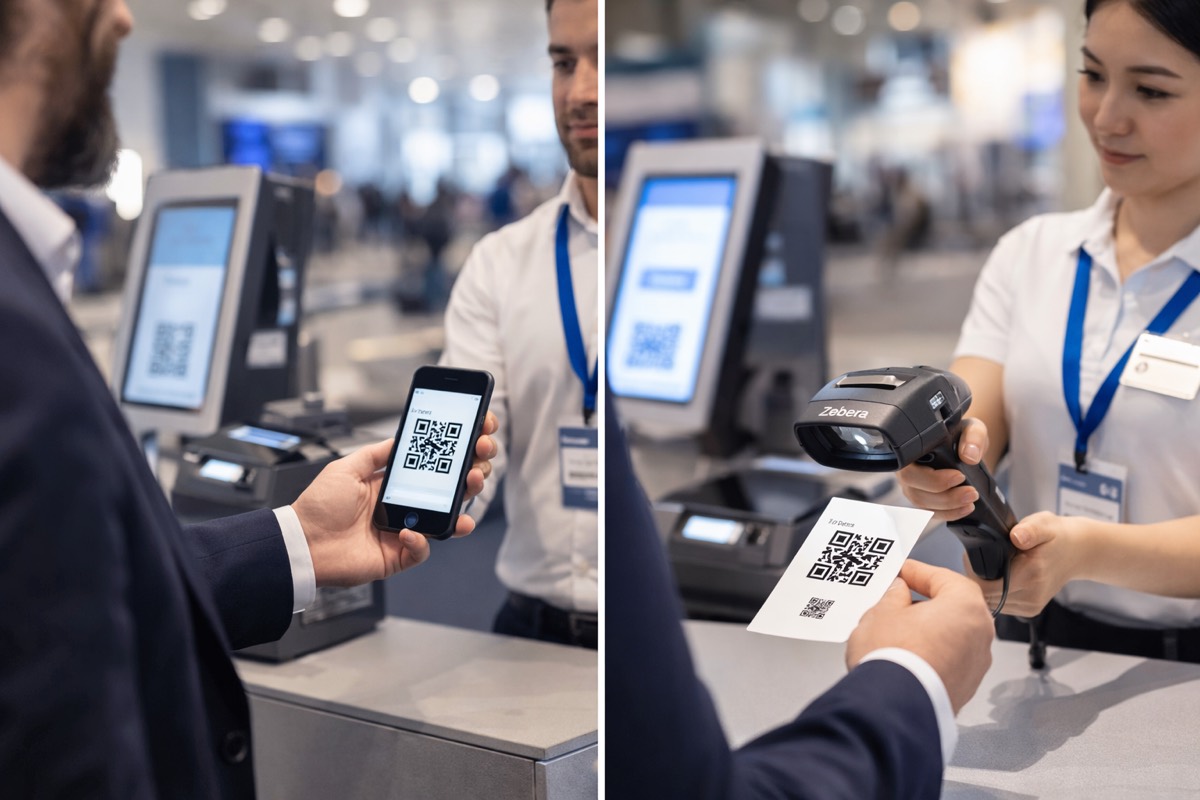
Phones vs Scanners for Event Check-In (2026): The Hybrid Setup That Prevents Queues
Most teams ask the wrong question:
“Should we use phones or scanners?”
The real question is:
“How do we keep check-in fast during the peak 30–60 minutes when everyone arrives at once?”
Because check-in doesn’t fail when your tools are “bad”. It fails when your flow can’t handle volume + exceptions at the same time.
This guide gives you a practical decision framework for 2026:
- when phone scanning is enough
- when dedicated scanners are worth it
- how to build a hybrid setup (phones + scanners + kiosks) that keeps queues moving
1) What “fast check-in” actually means (it’s a throughput problem)
Check-in speed is not your average check-in time. It’s your peak arrival capacity.
A simple way to think about it:
- Peak arrivals per hour (not total attendance)
- Average seconds per attendee
- Target wait time (most events aim for under 5 minutes)
Quick capacity math (copy/paste)
- If your average check-in takes T seconds
- One check-in station can process about 3600 / T attendees per hour
- Stations needed ≈ Peak arrivals per hour ÷ (3600 / T)
Then add buffer for:
- VIP handling
- onsite registration / walk-ins
- badge reprints
- name edits
Rule: plan for peaks, not totals.
2) The truth: scanning is rarely the bottleneck (exceptions are)
In real events, the scanner is usually not what slows you down.
The line collapses because of exceptions:
- attendee can’t find their QR
- wrong email / different spelling
- name/company/title edits
- VIP category mismatches
- “already checked in” duplicates
- badge printing delays
- walk-ins + payment issues
If your event check-in has one queue, you’re betting everything on “no exceptions.” That’s not a bet you want.
If you haven’t already, read this first:
This post goes deeper on device choice and hybrid setups.
3) Phones & tablets: when they’re enough (and how to make them fast)
Phone scanning is the default for a reason:
- quick to deploy
- flexible across entrances
- easy for “queue-busting” (staff roaming with devices)
- perfect for small and medium events
Phones win when:
- attendance is manageable or arrivals are spread out
- lighting is predictable
- you don’t have heavy badge printing at the same point
- you can assign a clean “scan-only” lane
Phones fail when:
- you have a huge surge in a short window
- the venue has glare, low light, or inconsistent lighting
- staff devices are mixed quality (old phones, weak cameras)
- staff are doing scanning + edits + printing at the same station
Practical phone scanning tips (tiny changes, big difference)
These are boring, but they save events:
- ask attendees to raise screen brightness before scanning
- scan perpendicular to the QR (avoid angles)
- don’t scan too close; step back until the QR is stable in frame
- avoid “scan + edit + print” on the same device during peak
- standardize staff devices if possible (don’t mix 5 different phone generations)
Best use of phones in large events: roaming staff + help desk + VIP escort. Let scanners handle the high-speed fast lane (next section).
4) Dedicated scanners: what they solve (speed consistency under pressure)
Dedicated scanners (handheld devices with scan triggers) are not “better tech”. They’re better operationally when volume is high.
Scanners are worth it when:
- you have a concentrated morning surge
- you need consistent scan performance for long shifts
- you’re scanning printed badges with glare, folds, or movement
- you want a “fast lane” that stays fast no matter what
What scanners give you in real life
- consistency (less variance between staff members)
- faster repeated scanning (trigger-based flow)
- reduced fatigue during long check-in windows
- a cleaner separation of roles: scan-only staff stay scan-only
Scanners don’t fix bad flow
If your fast lane is still doing:
- name edits
- walk-ins
- badge troubleshooting
…you’ll still get queues.
Devices help. Flow wins.
5) 2026 hardware reality: avoid buying “end-of-sale” models
If you’re buying scanning devices in 2026, check lifecycle first.
Some commonly used handhelds (like Zebra TC21/TC26) are no longer sold new, with published end-of-sale timelines and replacement models.
What to do instead (simple rule)
- If you’re buying new: choose current-generation devices (ask vendors for the latest model line)
- If you’re renting: ask the rental company what model they provide and confirm support availability
- Always budget for: spare devices, charging cradles, trigger handles, and backup power
Do not let your check-in plan depend on one device per lane with no backup.
6) The hybrid setup that works for most events (phones + scanners + clean lanes)
If you want check-in that survives peak arrivals, build lanes by purpose:
Lane A: Fast Entry (scan-only)
- scanners or standardized devices
- no edits, no printing troubleshooting, no payment issues
- objective: maximum throughput
Lane B: Help Desk (fix → then check in)
- search attendee
- edit fields
- handle duplicates
- reprint / special categories
- objective: exceptions without blocking Lane A
Separate station (optional): Walk-ins
- register + pay + badge
- objective: keep walk-ins from eating your main flow
Micro-role that saves events: a “line splitter”
One staff member at the start of the queue asking:
“Do you have your QR ready?”
Yes → Lane A
No → Lane B
It’s a tiny role. It prevents 10 small issues from collapsing the entire line.
7) When kiosks win (self-check-in + badge printing at scale)
Kiosks are the scale move when:
- you have very high volume
- you want to reduce staffing needs
- attendees are comfortable with self-service
- you need a polished, multilingual experience
Kiosks work best when:
- QR scan is fast
- badge prints immediately
- there is a nearby staffed help desk for exceptions
Kiosk rule: kiosks are for “happy path” check-in only. Exceptions must route to humans, fast.
If you’re operating in the UAE (DWTC / ADNEC / Expo City scale), this is worth reading:
8) Network & offline planning (don’t let Wi‑Fi be your single point of failure)
Every check-in plan needs a “what if the network struggles?” section.
Before event day:
- test scanning in the actual venue lighting
- test at peak device density (busy Wi‑Fi conditions)
- confirm what your system can do with weak connectivity
- bring a hotspot backup / dedicated registration network if possible
Your contingency checklist should include:
- printed lane signage (“Fast Scan / Help Desk / Walk-ins”)
- backup power (power strips + extension + chargers)
- spare labels/paper/ribbon (printing fails more often than scanning)
- a clear manual fallback procedure (who approves, who edits, who prints)
9) The 30-minute drill that makes this guide real
If you do one thing before the event, do this:
Run a check-in drill
Pick 10–20 test attendees and simulate real conditions:
- QR on phone screen (brightness high + low)
- printed QR (creases + glare)
- “can’t find my QR”
- “my name is wrong”
- “reprint needed”
- “already checked in” duplicate
Time each scenario with a stopwatch:
- Lane A average time
- Lane B average time
- percent of attendees that become exceptions
Then adjust:
- number of devices
- number of help desk staff
- lane signage
- printing layout
This turns “guessing” into a real plan.
10) Mini checklist (copy/paste for your ops team)
Device plan
- ✅ phones/tablets ready (camera permissions, brightness, battery)
- ✅ scanners assigned to fast lane (if used)
- ✅ spare devices + chargers + power strips
Flow plan
- ✅ Lane A = scan-only
- ✅ Lane B = fixes + reprints
- ✅ walk-ins separated if paid onsite
- ✅ line splitter assigned
Badge plan
- ✅ minimal badge fields (readable)
- ✅ test print before doors open
- ✅ spare labels/paper/ribbon + backup printer plan
Venue plan
- ✅ network tested
- ✅ hotspot / backup network plan
- ✅ signage placed and visible
Conclusion
Phones and scanners both work.
The winning setup in 2026 is hybrid:
- scanners (or standardized devices) power the scan-only fast lane
- phones support roaming staff, VIPs, and exception handling
- kiosks scale the “happy path” for high-volume events
- lane separation keeps exceptions from killing throughput
If you want to see a real QR check-in setup (phones + scanners + badge printing + live tracking) built for your event type, we can walk you through it.